The CPU question in agentic AI is easy to misread. A single agent can spend most of its time waiting for a large model to answer, leaving the processor with little to do. The more revealing test is what happens when many agent sessions run together: tool calls, code execution and other short jobs can then compete for CPU and memory. That’s the problem we’re trying to measure, in a field where repeatable benchmarks are still scarce. The recent rise in agentic workloads has already put new pressure on CPUs, but it hasn’t yet produced a settled way to compare how well hardware handles the work.
We’ve built an early test that follows agent sessions from prompt through tool use, with CPU and memory behavior separated from accelerator performance. The central design is in place, but the benchmark is still being developed. These results aren’t ready to be treated as definitive rankings; this is a look at how we’re building the test, what it captures so far, and where its limits are.
The benchmark sweeps across increasing numbers of concurrent sessions to find how much agent work a CPU can handle while keeping tasks reasonably interactive. There are blind spots. The field is changing quickly, and our current approach doesn’t cover every kind of agent workflow. Later in the article, we discuss those gaps and possible ways to handle multi-turn flows. This work is meant to add another tool to our local AI testing, not replace the rest of it. As agent workloads and hardware become better understood, the test will need to change with them.
What an agent loop actually does
Calling an AI agent a small worker with an LLM is a useful shorthand. For benchmarking, though, we need to be more specific. An agent gets access to tools—often Python functions in frameworks such as LangGraph—and chooses when to call them as it works through a task.
A tool might read or change a file, search a database, or run a test command. Here’s one of the functions available to our coding agent:
@tool
def run_command(command: str) -> str:
    """Run a build or test command in the repository root. Allowed: make [targets], python -m pytest [args]."""
    return traced("run_command", {"command": command}, lambda: ws.run_command(command))
The @tool decorator marks the function as something the model can call. The function takes a command argument and returns a string; its description tells the model which build and test commands are allowed. In this example, a tracing wrapper records the call. That wrapper isn’t central to understanding tools, but it will matter when we get to how the benchmark captures and replays agent activity.
Our coding agent has other tools for listing, reading, editing and searching files. A request such as “debug this Python script” might lead it to list the project files, open a script, search for relevant code, make an edit and run a test. If the test still fails, it can repeat some of those steps. That repeated cycle—model response, tool call, tool result, then another model decision—is the agent loop.
Why concurrency matters
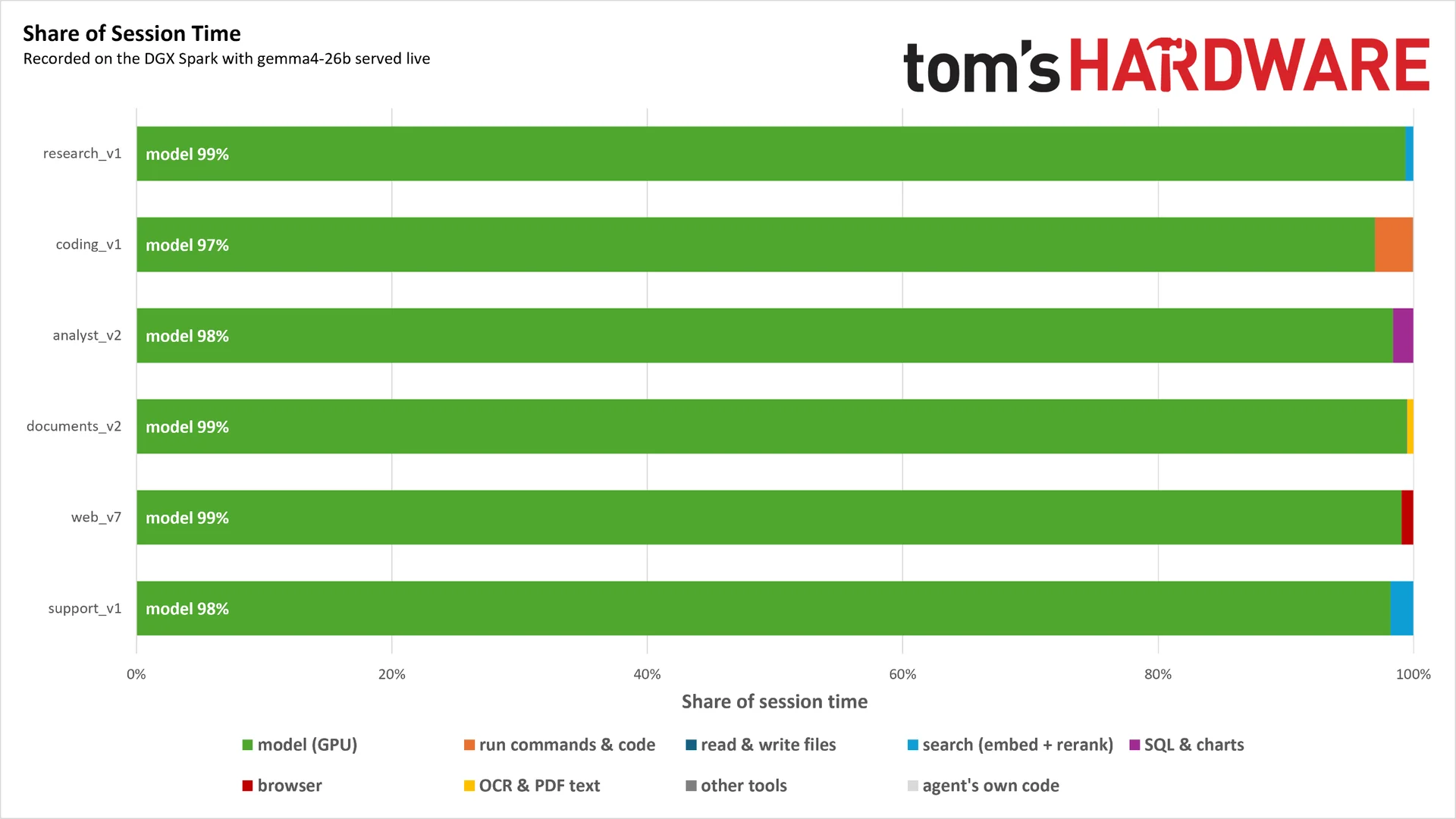
We developed the test on an Nvidia DGX Spark, built around the GB10, with 128 GB of unified memory, a Blackwell GPU and a relatively modest Arm-based Grace CPU. The chart above uses gemma4-26b-a4b. The model itself isn’t the point: we need one that can make tool calls, and we can record the same workloads again with other models as they become available.
What matters is the time split. In these sequential task runs, almost all of the elapsed time goes to GPU inference. Even the more demanding CPU work in the coding agent occupies only a small part of the run. With a capable GPU and a sufficiently large model, one agent—or a handful—doesn’t push the CPU very hard.
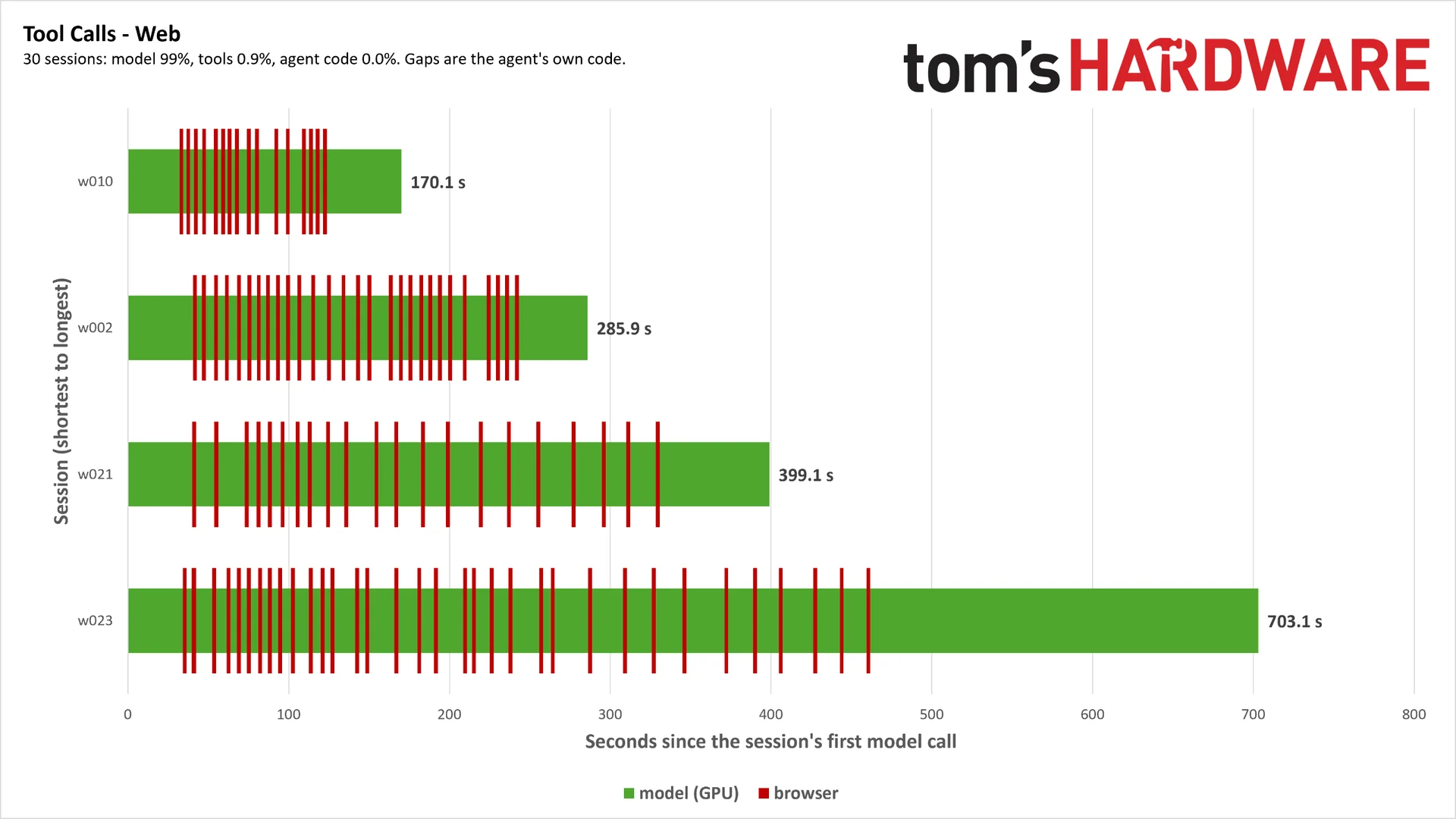
Zoom in on one task and the CPU work is visible, but it passes quickly against the longer inference intervals.
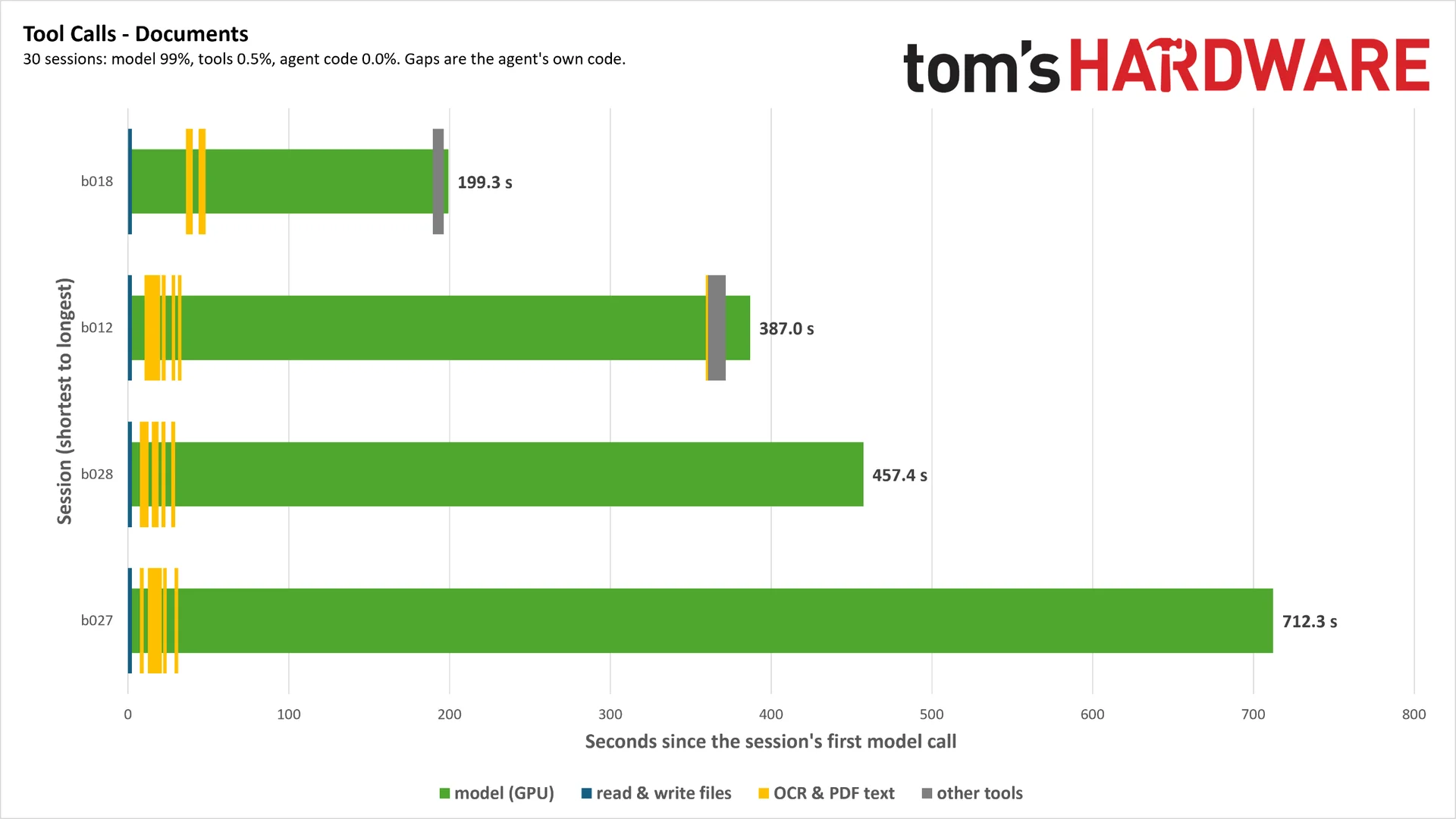
The work also arrives unevenly. Our document agent, for example, scans and extracts information from PDFs; much of its activity happens near the start, followed by a stretch dominated by GPU inference. A faster GPU shortens that inference time. To make the CPU the bottleneck for one agent using these common tools, we’d need a pronounced imbalance between the processors.
Concurrent sessions change the picture. Agents can spawn sub-agents, and separate sessions may run in sandboxed environments on the same machine. Now they’re competing for finite CPU and memory resources. So we designed the test to increase the number of sessions running their own task loops and observe where contention appears. As the load grows, small costs from tool calls, code execution and compilation, browsing and other agent work can accumulate across the chip.
How the benchmark records and replays work
Each custom LangGraph agent works through 30 tasks against a llama.cpp server running gemma4-26b-a4b. A proxy sits between the agents and the model server, recording the exchange so the benchmark can later replay it.
When we record a run, the proxy forwards each model request to the live server and saves the request and response in a master JSON file. Tool calls are recorded separately. We also generate the expected response for each task, hash it and store it in its own JSON file.
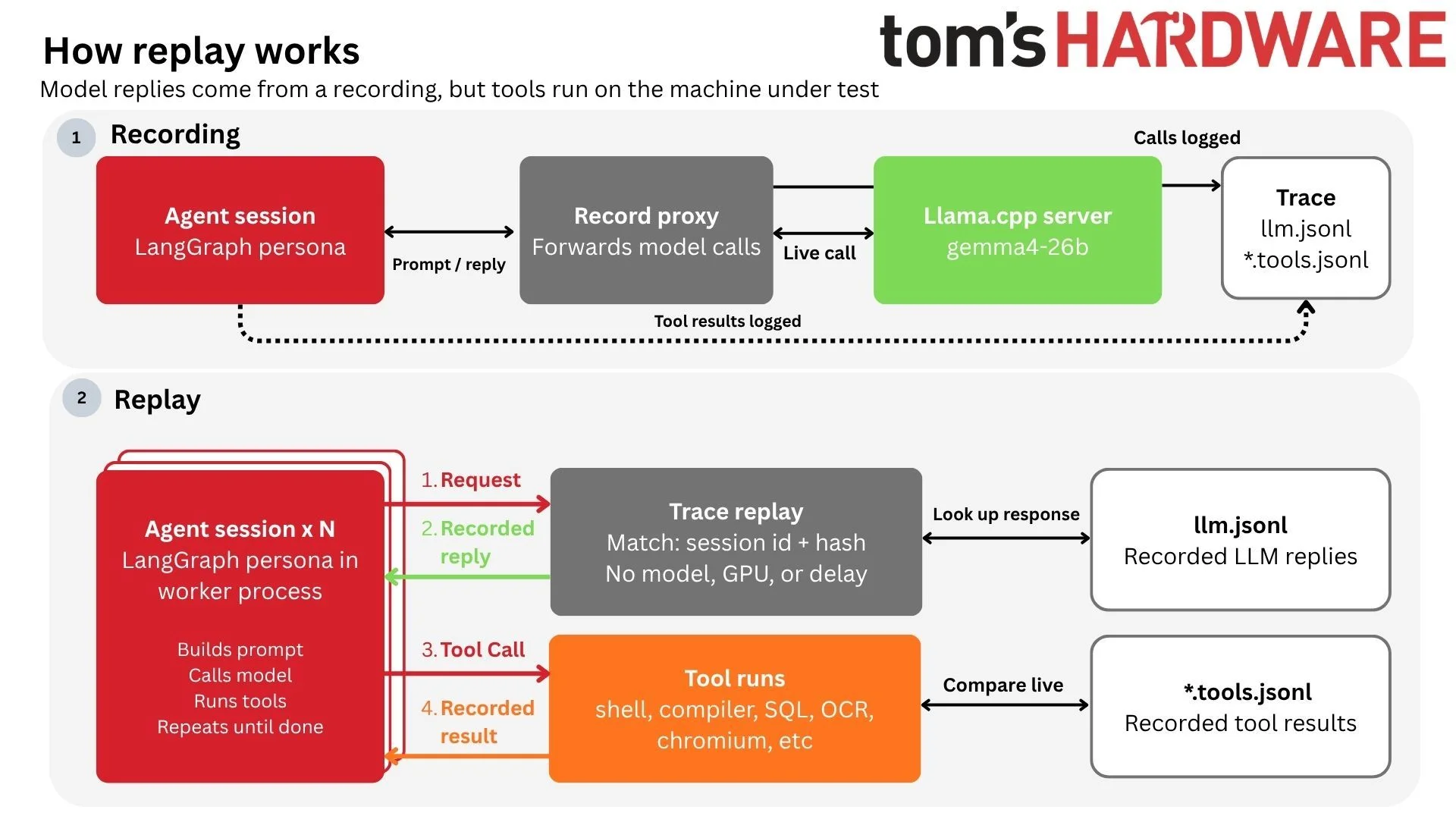
Once a trace exists, we can take live model inference out of the CPU sweep. The agents still run and make requests, but the proxy matches each request to the recorded trace and returns the saved response immediately. It checks the session label and request hash before sending anything back. A mismatch stops the run and invalidates it.
Tool calls are checked against their recorded versions too. The proxy compares the live call with the expected call, then returns the recorded result—even when the call matches—so later steps don’t drift because of a changed tool result. Any genuine mismatch gets logged, and the affected run level is marked invalid.
That trace based design gives us room to change the workload. We can add a LangGraph persona, try another framework such as CrewAI, or record new traces against a different model, including one with expanded capabilities. If the model speaks through an OpenAI-compatible endpoint, we can swap parts of the test to cover a wider mix of workloads.
The sweep starts with one worker process and increases to the CPU’s maximum thread count. We run each level three times. Each worker follows the same 30-task list, but starts at a different point: worker one begins at task one, worker two at task two, and so on. Since tasks vary in duration, that offset creates uneven overlaps and, in turn, uneven contention.
What the scores tell us
We report sessions per second: the number of end-to-end tasks completed at each concurrency level. At low concurrency, throughput may be below one session per second because a task takes longer than a second. We’re interested in how that rate changes as more sessions run, and how CPUs compare under rising agent workload.
There are two summary measures. Peak throughput is the highest sessions-per-second result, reported alongside the concurrency level where it occurred. Ideal throughput marks the highest point at which the slowest five percent of sessions take no more than 1.5 times as long as a session at base concurrency. Some slowdown is expected as sessions accumulate. Beyond that threshold, task times rise sharply, and a processor’s topology can help determine whether throughput begins to fall.
The frozen replay sweep removes GPU delay and puts as much concurrent work as possible on the CPU. That gives us a view of CPU throughput under the assumption that GPU compute is available whenever needed. It’s useful, but it isn’t a complete system result. In a real setup, a weak GPU can make agents wait for inference, leaving both processors underused; the balance between CPU and GPU can change the outcome.
We can also run the sweep with live inference to measure the system as a whole. The agents still receive recorded responses to keep the task results consistent, while the llama.cpp server processes each request and generates the same number of tokens before its output is discarded. This brings in the usual inference pipeline—prefill, decode and cache behavior—as well as queuing for GPU access.
Those two views answer different questions. Live runs show local AI performance across the system. Frozen replays show how much agent work the CPU can process when inference delay is removed. Neither should be mistaken for a universal measure of agent performance: a fully end-to-end result depends on too many system and workload variables to make one number broadly applicable.
Six starting agent personas
We’ve created six personas, each a Python script built with LangGraph that defines the agent’s tools and workflow. Each works from its own set of local tasks and documents. The research persona, for instance, answers questions using a local English Wikipedia corpus of about 50,000 articles.
Persona | Sub-tasks | Description | Tools |
Analyst | Planner, analyst, writer | Answers questions about a fictional retail company by querying DuckDB with SQL, then writes a report. | List tables, describe tables, run SQL query, make chart from query |
Coding | Coder, reviewer | Fixes a reported bug in one of four small projects: two in C and two in Python. | List files, read files, code search, file edits, command execution, test review |
Documents | Intake, extractor, auditor | Scans purchase orders, invoices and other accounting documents, then checks invoices against purchase orders. | List documents, extract text from PDF, extract tables from PDF, Tesseract OCR, basic arithmetic |
Research | Planner, researcher, writer | Searches a local English Wikipedia corpus to answer questions. | Query corpus |
Support | Triage, researcher, responder | Answers tickets for a fictional company using its knowledge base. | Knowledge base search, read articles |
Web | Planner, browser agent, writer | Searches for products that meet specified criteria in a headless Chromium session. | Open URL, click web element, enter text, select option, go back, read more of page |
Five personas follow a similar broad pattern: plan the work, run the main agent loop and produce a response. The analyst starts by turning a question into a structured plan of two to four steps. Analyst agents then query the database in parallel, and a writer combines their findings.
The coding persona takes a different route. It receives an issue report resembling a GitHub bug report, investigates one of four projects and runs tests to check its proposed fix. A reviewer then examines the change before it’s applied.
The benchmark is useful as a starting point, but its single-turn design leaves out a defining feature of many agent workflows: context carried across tasks. An agent might query a support knowledge base several times to answer one question, yet its next customer interaction starts fresh. We can script multi-turn sequences, but longer exchanges raise the risk of divergence, crashes, and context-window overflow. That work is possible; it just hasn’t been a priority so far.
To make the workloads concrete, here’s one representative task for each persona. The examples show what the agents do and what information they rely on:
Persona | Example Task | Source of Truth |
Analyst | “How do discounts affect gross margin across categories?” | DuckDB warehouse |
Coding | Invoice project – Saturday due dates move to Sunday, not Monday | PyTest, make |
Documents | Approve correct invoices from purchase orders based on a price from a list of six documents across four scans. | Faux PDF invoices, purchase orders, and goods received notices with errors planted |
Research | “What causes earthquakes and how are they measured?” | 50,000-article English Wikipedia corpus |
Support | “How long a two-factor code stays valid” | Knowledge base for fictional smart home company |
Web | Highest-rated 55L backpack and lightest waterproof boots | Local website for an outdoor gear store |
The rest of the tasks follow these patterns. Document agents approve invoices while the documents and planted errors vary. Support agents answer questions about topics such as error-code troubleshooting and company policies; some requests combine several questions and require evidence from different parts of the knowledge base. The table is a sample, not a full inventory.
Where the benchmark falls short
The current results come from just two machines: a 64-core Threadripper system with 128GB of DDR5-6000 RDIMMs, and a DGX Spark. That’s a narrow hardware base for workloads whose CPU demands can shift with GPU speed, model choice, quantization, and server settings.
Expanding the test to other setups could mean changing workloads, recording them again, or switching models—and then rebuilding the results. The range matters: an Intel system is only one possibility among Mac Studio clusters and GPU-heavy workstations. For now, the benchmark can’t tell us how broadly its findings carry across that variety.
There’s also a gap between local tools and cloud models. The test can connect to frontier models through an API, while keeping tools local unless the agent runs inside a fully cloud-based sandbox. So if you’re using an AI coding assistant on a budget laptop, the model may be remote, but compilation, tests, and agent code still use your machine. A weaker host paired with a cloud API is a planned area of study, but API costs made it impractical to use during the initial setup.
Sandboxing needs more attention, too. The current setup uses a Docker image, which adds less than 2% overhead compared with running directly on bare metal. Other ways of isolating local agents haven’t been tested enough to establish their cost.
A starting point, not a permanent scorecard
“Agentic AI” still means different things to different people, and both models and hardware keep changing. A benchmark that claims to settle the field once and for all would be chasing a moving target. This one is better understood as an initial framework that can be revised as the systems and workloads change.
The immediate next step is collecting the first real results. So far, the effort has gone into making sure the system works and can record and replay traces, including a basic test of Python’s free-threaded build to examine the GIL’s effect within a single session.
The framework choice is another open question: the current tests use LangGraph exclusively. CrewAI, along with one-click agents such as Hermes and OpenClaw, still needs to be explored. For anyone comparing agent hardware, the takeaway is straightforward: these tests offer a way to start asking better questions, but their results will need broader machines, frameworks, and multi-turn workloads before they can support sweeping conclusions.


