The JSAUX FlipGo makes a strong case for a two-screen workstation you can move around the office. Its two 16-inch, 2560 x 1600 panels give you more room and sharper text than the 1080p screens common on portable dual monitors. Windows users also get touch input on both displays, while the built-in hub adds three ports for peripherals. The tradeoff is physical: at 4.18 pounds, this is a substantial piece of kit to carry on a trip.
At a street price of $479, the FlipGo sits in the same broad price range as other portable dual-screen products. Its specifications and measured color performance help explain the cost. Its weight, however, changes what “portable” means in practice. I’d think of it as a movable desktop display for a shared workspace or office, rather than something most people will want to pack every day.
A sturdy frame with a travel-sized label
JSAUX builds the FlipGo around a thick aluminum chassis, and the result feels more like compact office hardware than a lightweight travel accessory. The frame resists flex, and the hinges hold their position without noticeable play. You can set the screens at the angle you need, and the hardware feels suited to frequent opening and repositioning.
That construction comes with a cost in weight. The FlipGo measures 14.41 x 9.45 inches and is 0.7 inches thick, with both displays folded into one unit. Its 4.18-pound weight exceeds that of a 14-inch Apple MacBook Pro by more than half a pound. The size and weight make it awkward for many laptop bags and backpacks, even before accounting for the laptop and cables that would travel with it.
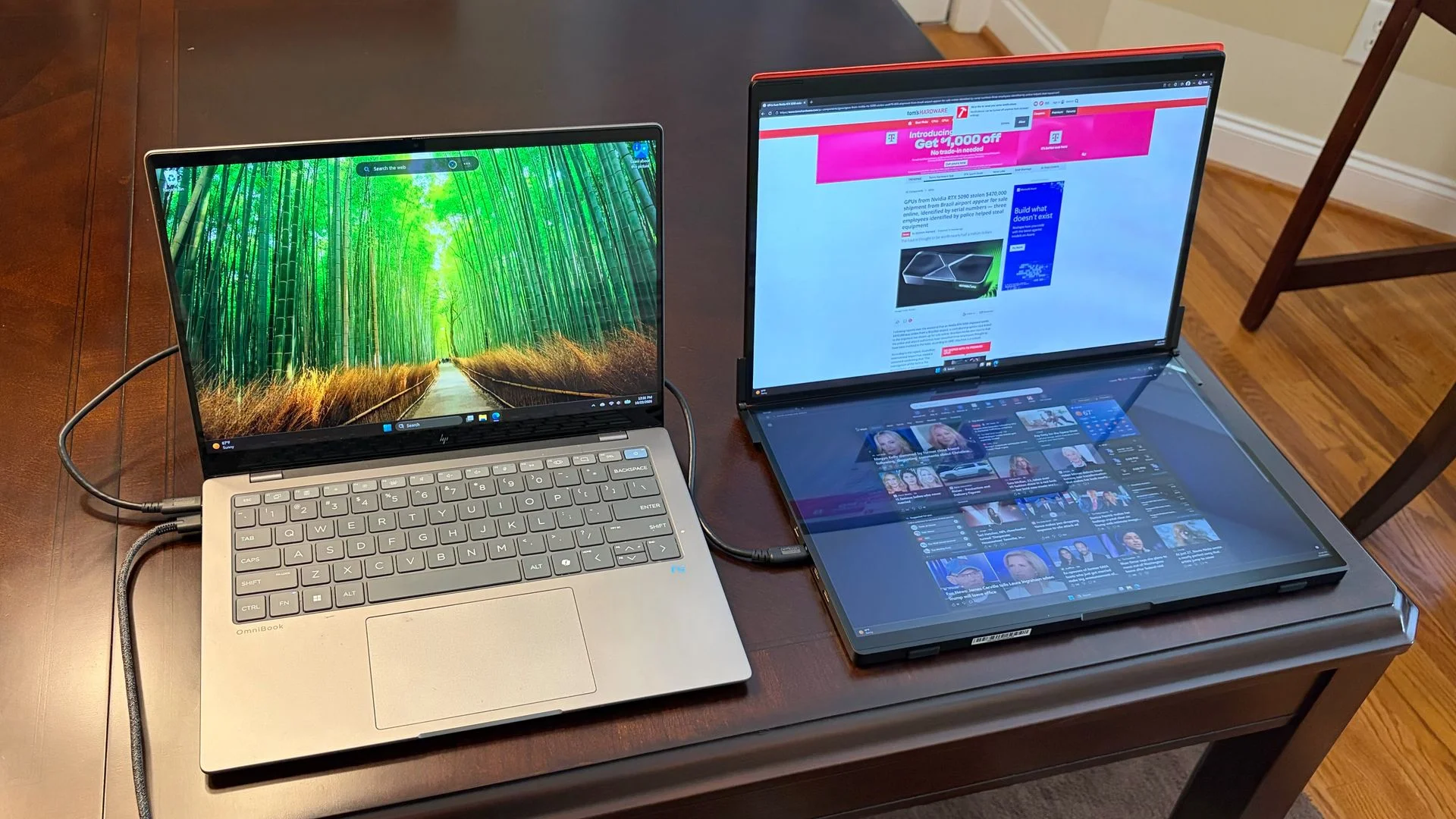
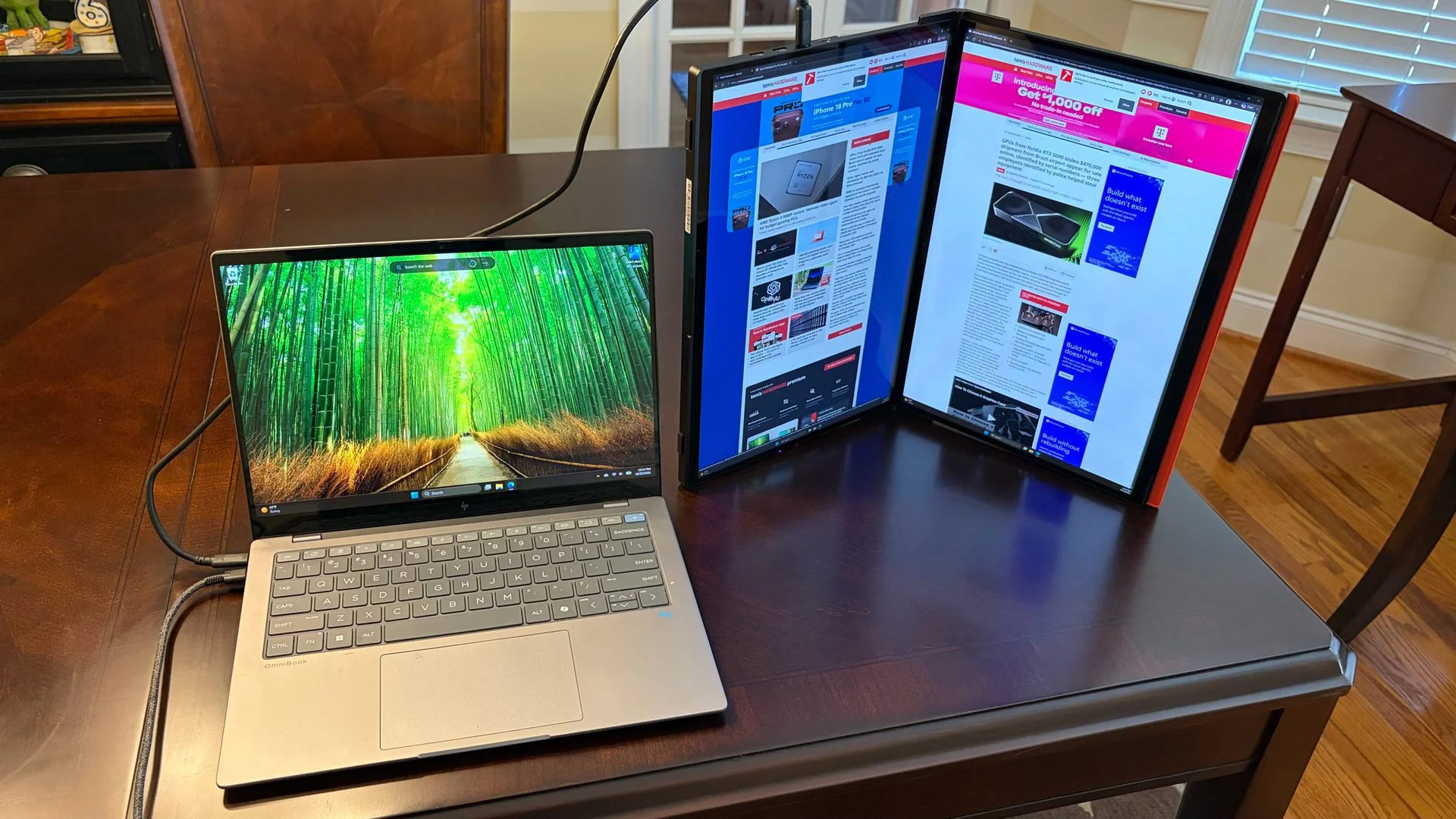
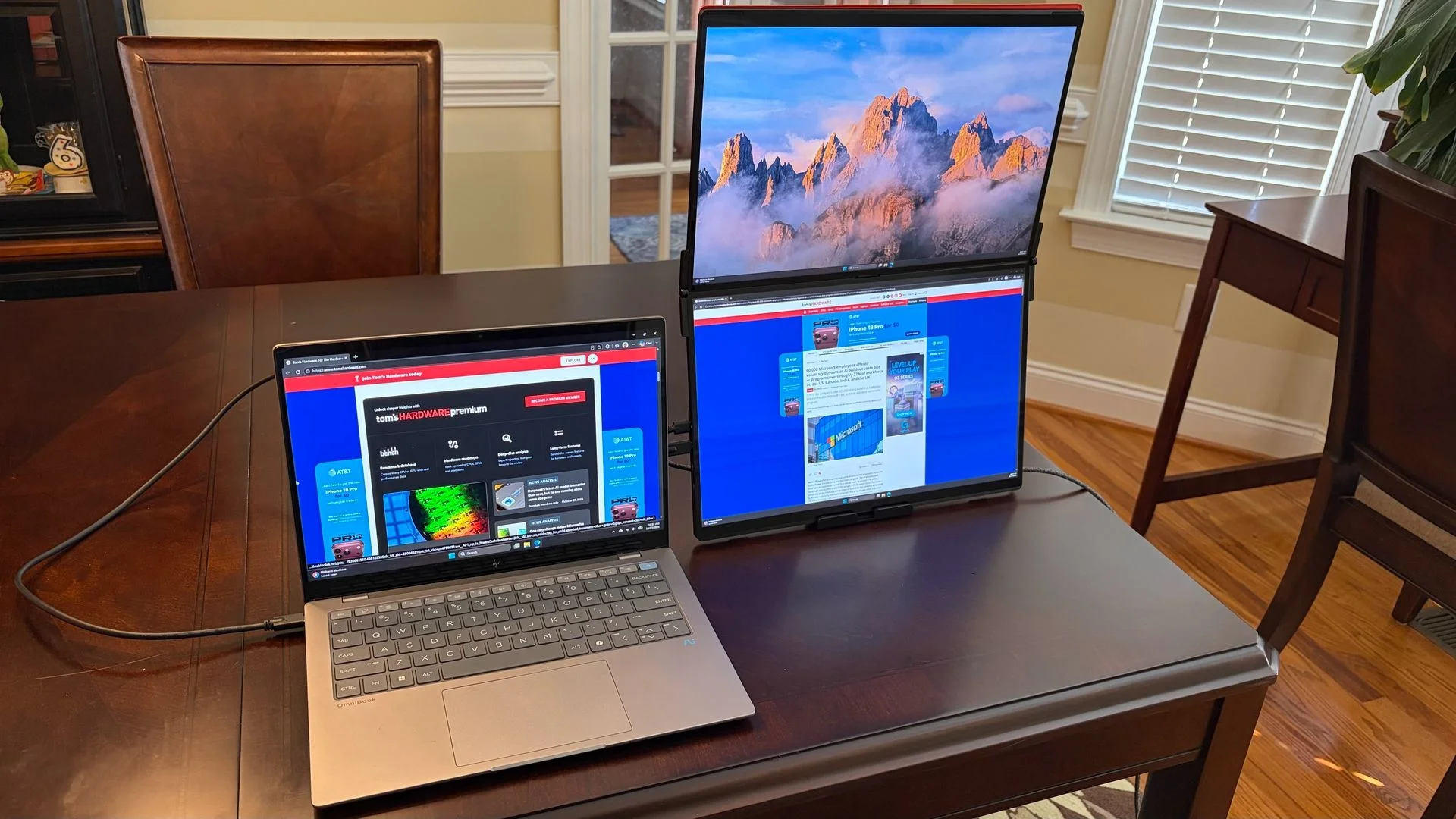
The included stand supports two layouts. In landscape orientation, one screen sits above the other; in portrait orientation, the displays stand vertically side by side like an open book. Both options make sense for different kinds of work, though the portrait arrangement is especially useful when you want more vertical space for documents and webpages.
Sharper panels, touch support, and a built-in hub
Each screen is a 16-inch IPS panel with a 16:10 aspect ratio, 2560 x 1600 resolution, and a 60 Hz refresh rate. That resolution gives the FlipGo a practical edge over dual-monitor rivals that use 1920 x 1080 panels. More pixels mean room for longer spreadsheets and documents, and less scrolling through dense pages.
The displays have a glossy finish, which is unusual for this category. Here, it accompanies native 10-point touch support in Windows 11. Touch worked on both panels without additional software during testing. macOS users should take note: touch is unsupported, and the FlipGo only mirrors the two screens in that operating system. Using it with a Mac also requires both USB-C and mini-HDMI connections. The less expensive non-touch FlipGo is likely the better fit for Mac owners.
Connectivity is split across the bottom panel. Two USB-C ports and two mini-HDMI ports handle video connections. The built-in hub adds two USB-A ports and one USB-C port for peripherals, with a three-way jog wheel and power button nearby for display controls. There are no speakers.
One USB-C cable can carry power, video, and data when connected to a compatible laptop with DisplayPort over USB-C. A second USB-C port supports up to 60 watts of power passthrough to the laptop when a power adapter is connected. The box includes two USB-C cables, a mini-HDMI-to-HDMI cable, and a USB-C wall adapter.
Controls are simple, but settings apply to both screens
A jog wheel handles the on-screen display. Moving it left or right adjusts brightness; moving it up or down navigates the menus. Pressing the wheel selects an item, while a press of the power button backs out of a menu. Holding the power button turns the monitor off.
The menu includes brightness, contrast, sharpness, color temperature, saturation, hue, and input selection. There’s one notable limitation: picture settings aren’t independent. Changes made for one panel also affect the other. That keeps operation straightforward, but it rules out tuning each screen separately to compensate for differences in viewing angle or content.
Setup and day-to-day use
Testing used a Windows 11 HP OmniBook X, since Windows supports both extended and mirrored displays. With a USB-C port capable of DisplayPort output, setup can be as simple as connecting one cable. In testing, that single connection handled power, video, and data, and both screens were ready to use.
The two panels worked well alongside the OmniBook’s built-in display. In portrait mode, the FlipGo made it easy to keep two webpages open while retaining the laptop screen for another task. A document beside a spreadsheet was another useful arrangement, particularly because the extra vertical resolution reduced scrolling in Excel.
Windows touch input behaved as expected on both displays. The main compromises showed up before and after use: the body is heavy to carry, and Mac users face both touch and display-mode limitations. For a Windows workstation that gets moved between desks, the connection options and integrated hub make the setup convenient.
Color is a clear strength, brightness falls short of the claim
JSAUX rates the displays at up to 500 nits, but testing measured a peak of 319 nits. That’s a significant gap from the stated figure and worth considering if you need to work in a bright environment. The screens were brighter than those on the previously reviewed FlipGo Horizon Pro, which measured 247.4 nits, but the published 500-nit rating wasn’t borne out.
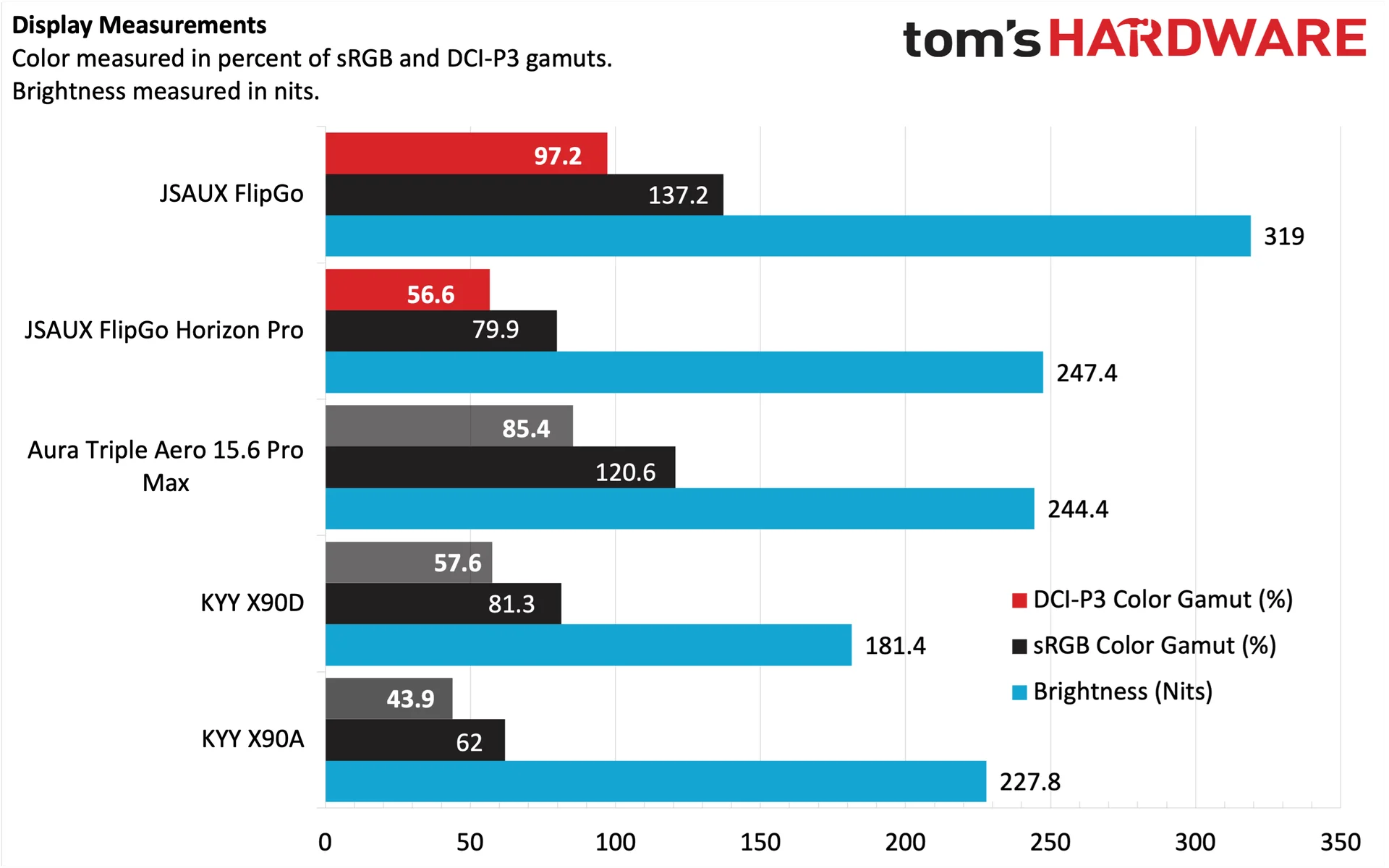
Color coverage is the FlipGo’s stronger measurement: it covers 97.2 percent of DCI-P3 and 137.2 percent of sRGB. The Aura Triple Aero 15.6 Pro Max came closest among the comparison products, at 85.4 percent of DCI-P3 and 120.6 percent of sRGB. In use, the FlipGo’s panels looked more colorful than the Horizon Pro’s, and their color balance matched the glossy display on the test laptop well. That consistency matters when moving windows between screens; a large mismatch can make one display feel noticeably out of place.
Specifications
Panel Type / Backlight | IPS |
Screen Size / Aspect Ratio | 16 inches / 16:10 x2 |
Max Resolution & Refresh Rate | 2560 x 1600 @ 60Hz |
Typical Brightness | 500 nits |
Contrast Ratio Typical | 1,200:1 |
Video Ports | 2x USB-C, 2x micro-HDMI |
USB Hub | 2x USB-A, 1x USB-C |
Speakers | None |
Weight | 4.18 pounds |
Warranty | 1 year |
A strong desk upgrade, with a clear mobility limit
The FlipGo combines two high-resolution panels, useful Windows touch support, solid construction, flexible video inputs, and a handy USB hub. Its color coverage and the match with a laptop display make it a capable productivity companion, especially for work that benefits from several documents or applications on screen at once.
At $479, the value depends on where you plan to use it. The 4.18-pound chassis and larger folded footprint make regular air travel or a daily commute less appealing. For people who move between desks or want extra screen space without installing a conventional desktop monitor, that heft may be an acceptable trade for the sturdier build and pair of 16-inch displays. The key decision is whether your second screen setup needs to travel often, or simply needs to move when your work does.


