The Samsung Portable SSD P9 makes its strongest case when a portable drive has to keep writing long after a short benchmark ends. In testing, it led the field in synthetic transfers and handled extended writes at roughly 2,200 to 2,400 MB/s for much of a 15-minute run. That performance puts it ahead of Corsair’s EX400U in demanding work, though Samsung asks a premium price for the advantage.
This is Samsung’s first USB4 external SSD. Its 40Gbps interface supports rated sequential reads of up to 4,000 MB/s and writes of up to 3,700 MB/s for the 1TB model, or 3,800 MB/s for larger capacities. The P9 comes in 1TB, 2TB, 4TB, and 8TB versions. At the time of testing, the 2TB model was the only capacity in stock.
Speed comes with a steep price
The 2TB drive tested here costs $649.99. Samsung lists the 1TB model at $339.99, the 4TB model at $1,439.99, and the 8TB version at $2,879.99. Those figures make the P9 a serious purchase for creators moving large video projects, high-resolution image libraries, or other bulky files. The price is easier to understand in a USB4 market where competing drives have also become expensive and some models are difficult to find, but the P9 still costs more than Sandisk’s 2TB Extreme Pro.
At the time of writing, Sandisk’s 2TB drive sold for $549, making it $100 cheaper. Corsair’s EX400U had climbed to $692 for 2TB, while LaCie’s Rugged SSD4 was listed for roughly $750 to $800. The older launch prices tell a different story: Corsair introduced its 1TB EX400U at $119 in early 2025. Availability and current pricing have shifted since then, so shoppers should compare what’s actually in stock rather than rely on launch prices.
For systems that don’t need USB4, Crucial’s 20Gbps X10 offers another price point: its 2TB version was selling for $399. That’s a different speed tier from the P9 and other 40Gbps drives, but it may be enough for less demanding transfers. The practical choice comes down to whether the faster interface and stronger sustained writes will save enough time to justify the extra cost.
Specifications and physical design
Product | 1TB | 2TB | 4TB | 8TB |
Pricing | $339.99 | $649.99 | $1,439.99 | $2,879.99 |
Interface / Protocol | USB4 Gen 3x2 (40Gbps) | USB4 Gen 3x2 (40Gbps) | USB4 Gen 3x2 (40Gbps) | USB4 Gen 3x2 (40Gbps) |
Sequential Read | Up to 4,000 MB/s | Up to 4,000 MB/s | Up to 4,000 MB/s | Up to 4,000 MB/s |
Sequential Write | Up to 3,700 MB/s | Up to 3,800 MB/s | Up to 3,800 MB/s | Up to 3,800 MB/s |
Dimensions | 3.5 x 2.6 x 0.3 inches | 3.5 x 2.6 x 0.3 inches | 3.5 x 2.6 x 0.3 inches | 3.5 x 2.6 x 0.3 inches |
Weight | 0.21 pounds | 0.21 pounds | 0.21 pounds | 0.21 pounds |
Warranty | 5 years | 5 years | 5 years | 5 years |
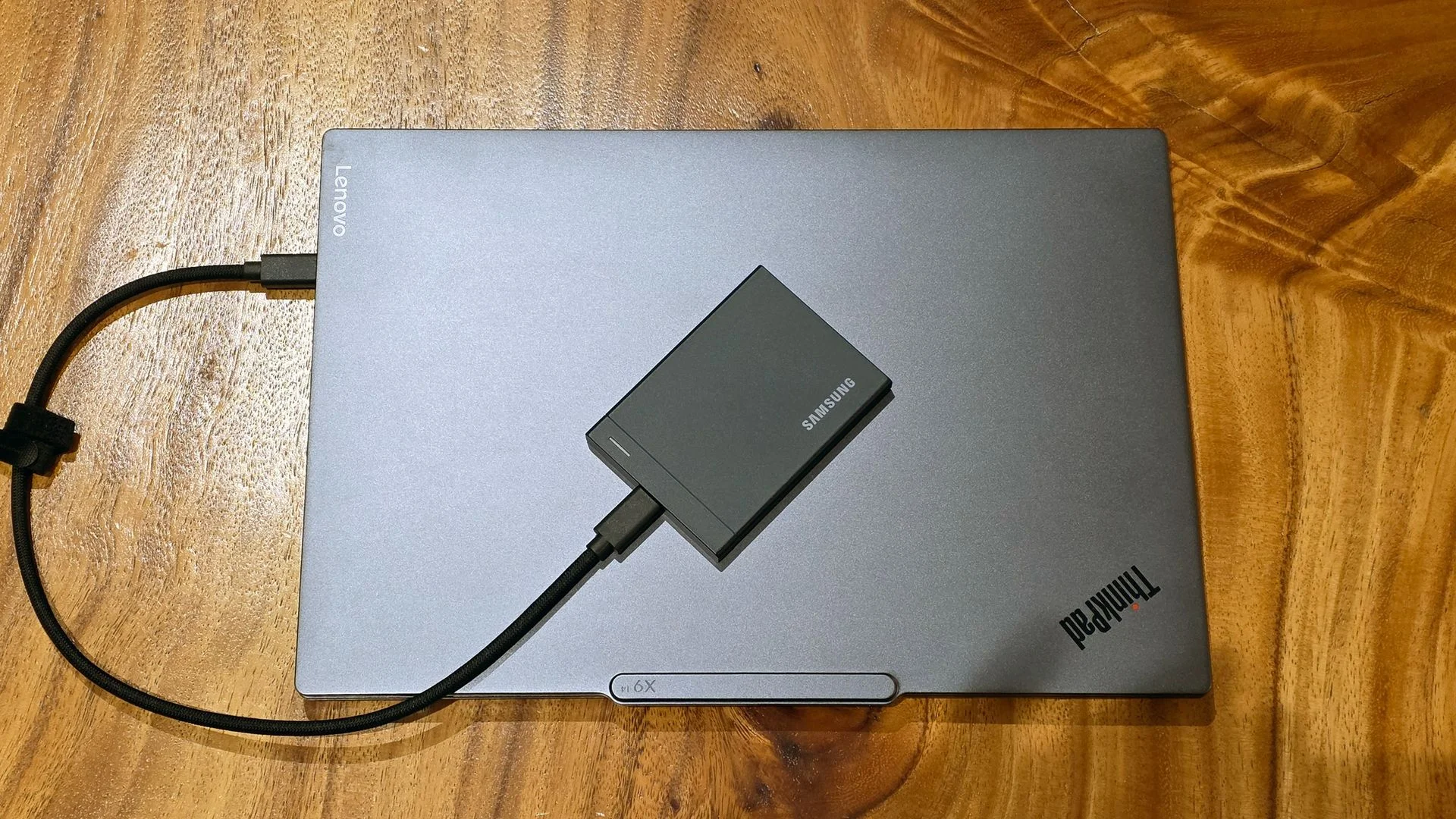
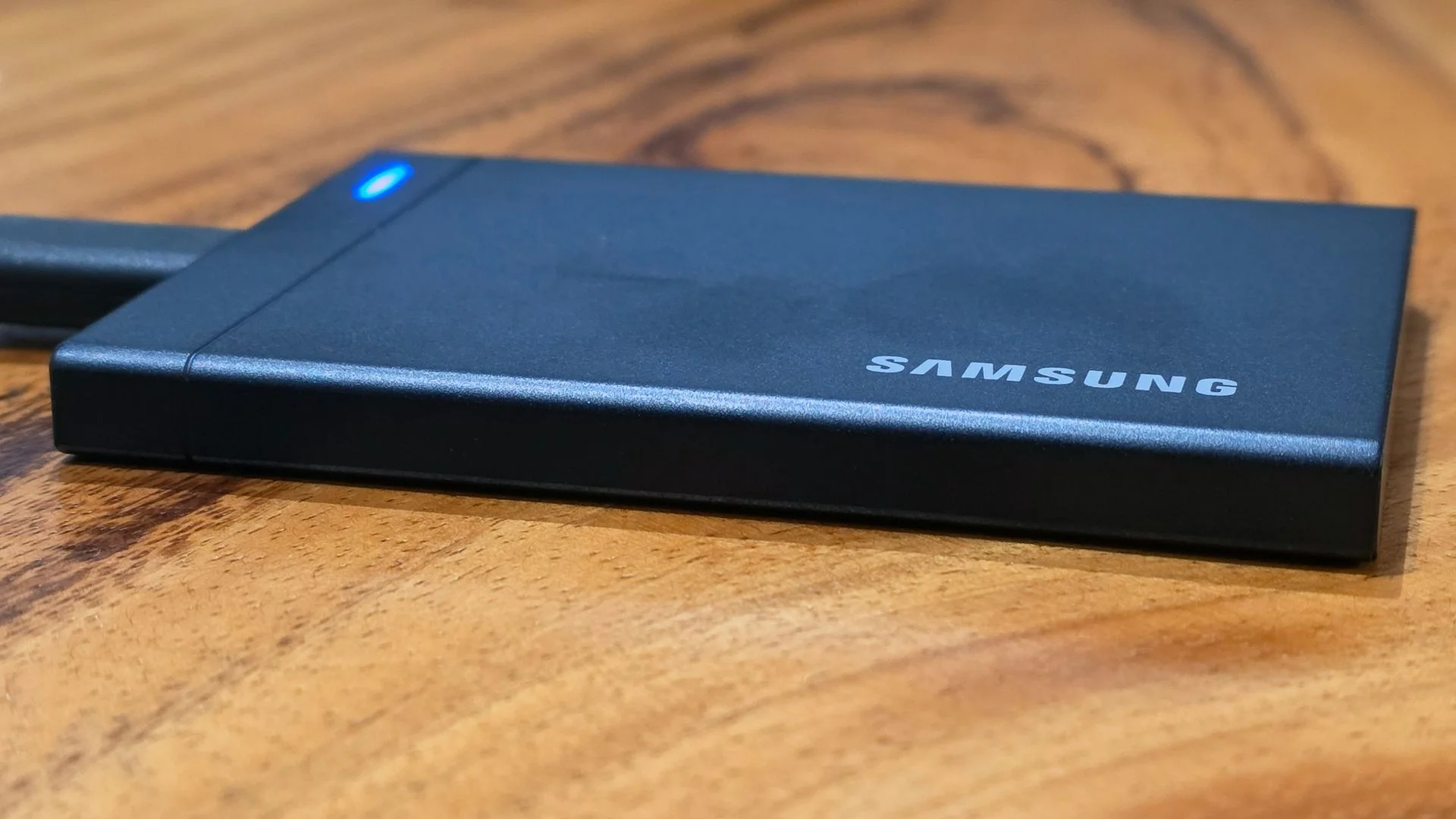
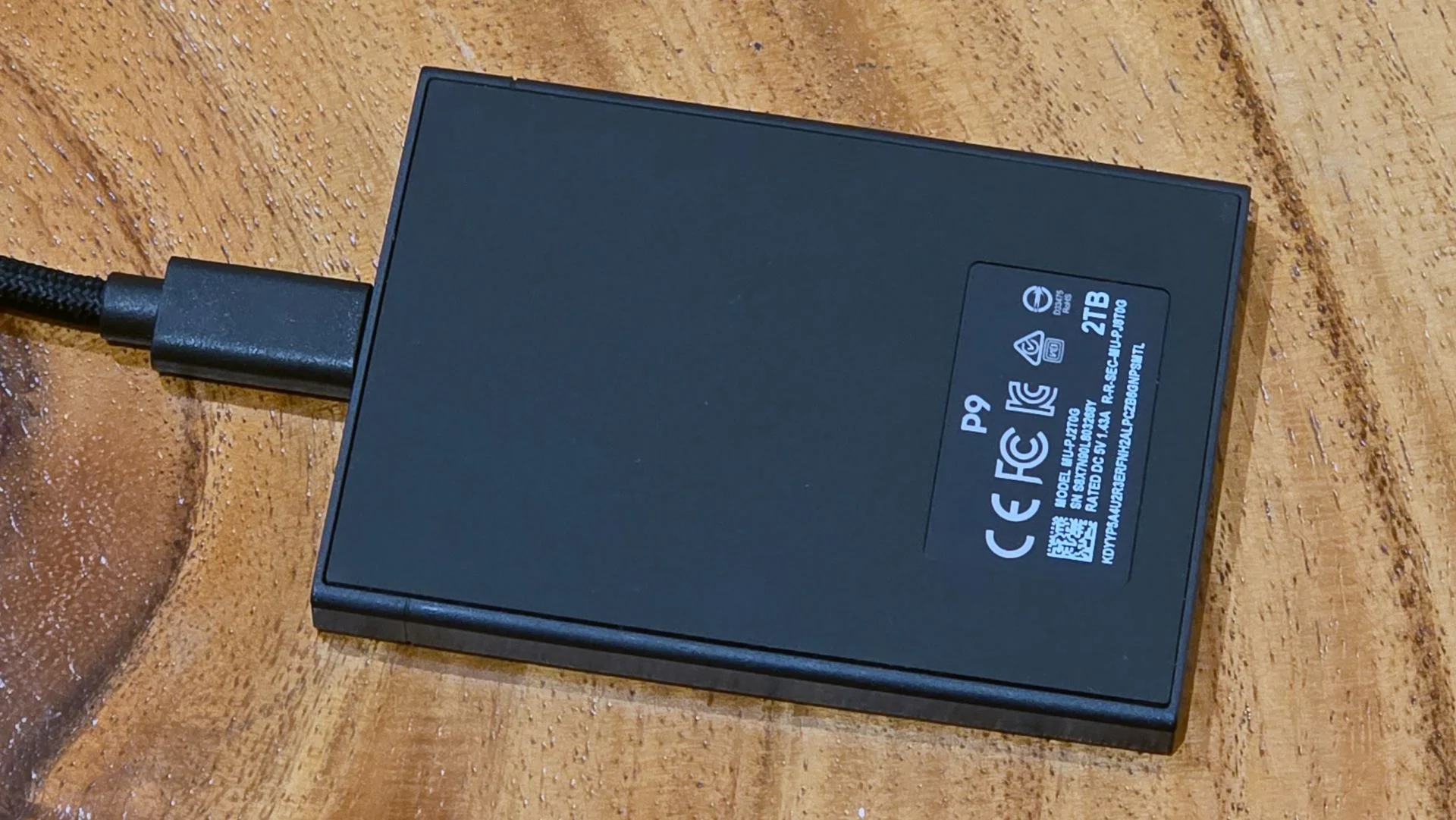
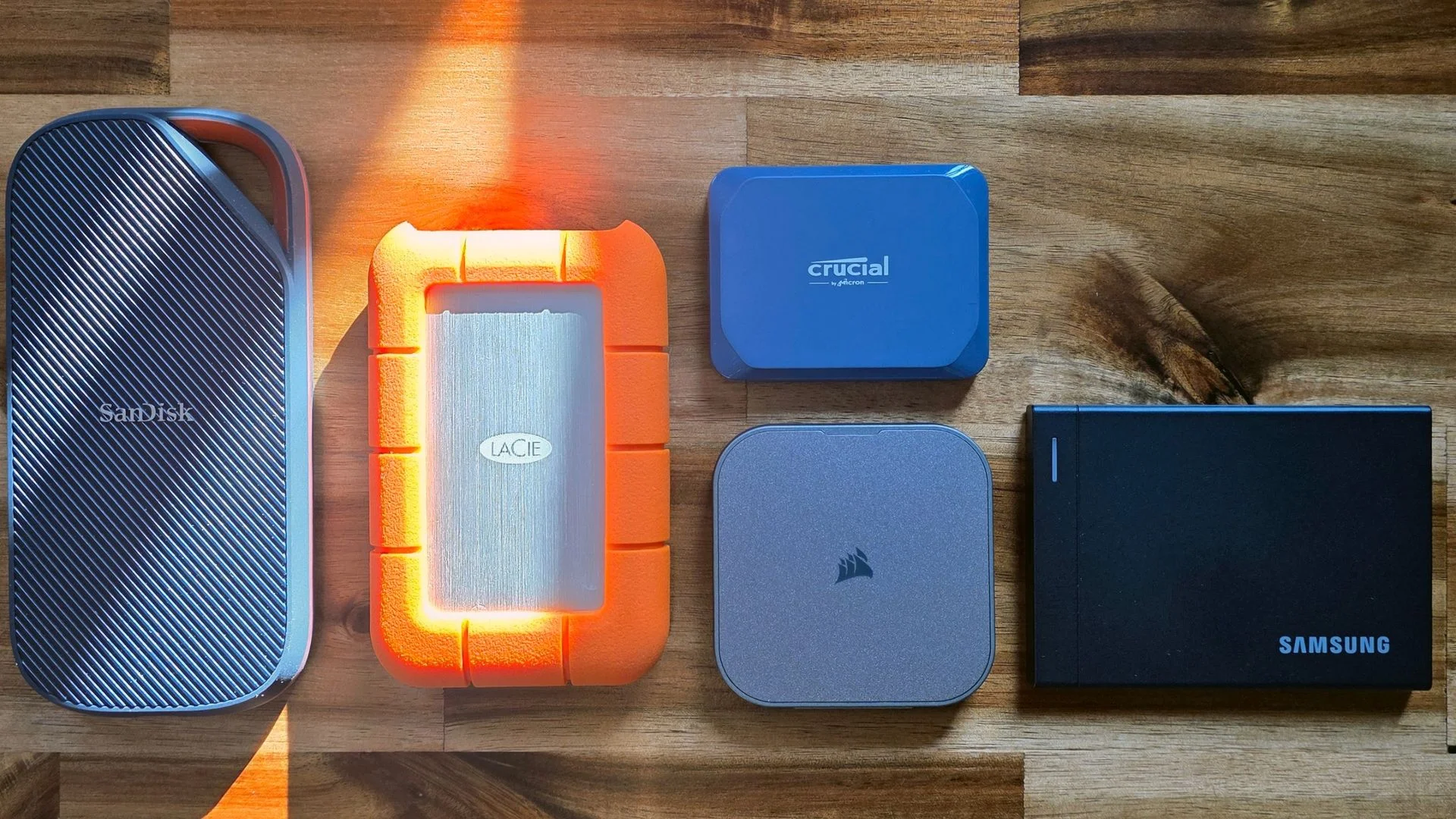
The enclosure measures 3.5 x 2.6 x 0.3 inches and weighs 0.21 pounds across all capacities. It isn’t the smallest or lightest portable SSD, but its thin profile makes it easier to slip into a bag than Samsung’s T9. The P9 also doubles the T9’s connection bandwidth: USB4 at 40Gbps versus the older drive’s 20Gbps.
Samsung has traded the T9’s textured rubber exterior for a solid-feeling metal shell. A rubberized base helps the drive stay put on a desk. The visible seam around that base is less reassuring, and Samsung doesn’t list an IP rating for dust or water resistance. The P9 is rated to survive a drop of up to two meters; its rigid construction feels reassuring, though that rating is the concrete durability measure to rely on.
The bundled USB-C cable is about 16 inches long, excluding its connectors. Its braided finish feels unusually pleasant, and two hook-and-loop straps help manage slack. There’s no other notable accessory in the box. The extra cable length is useful for a desktop setup, where a short lead can limit where the drive sits.
Software and drive management
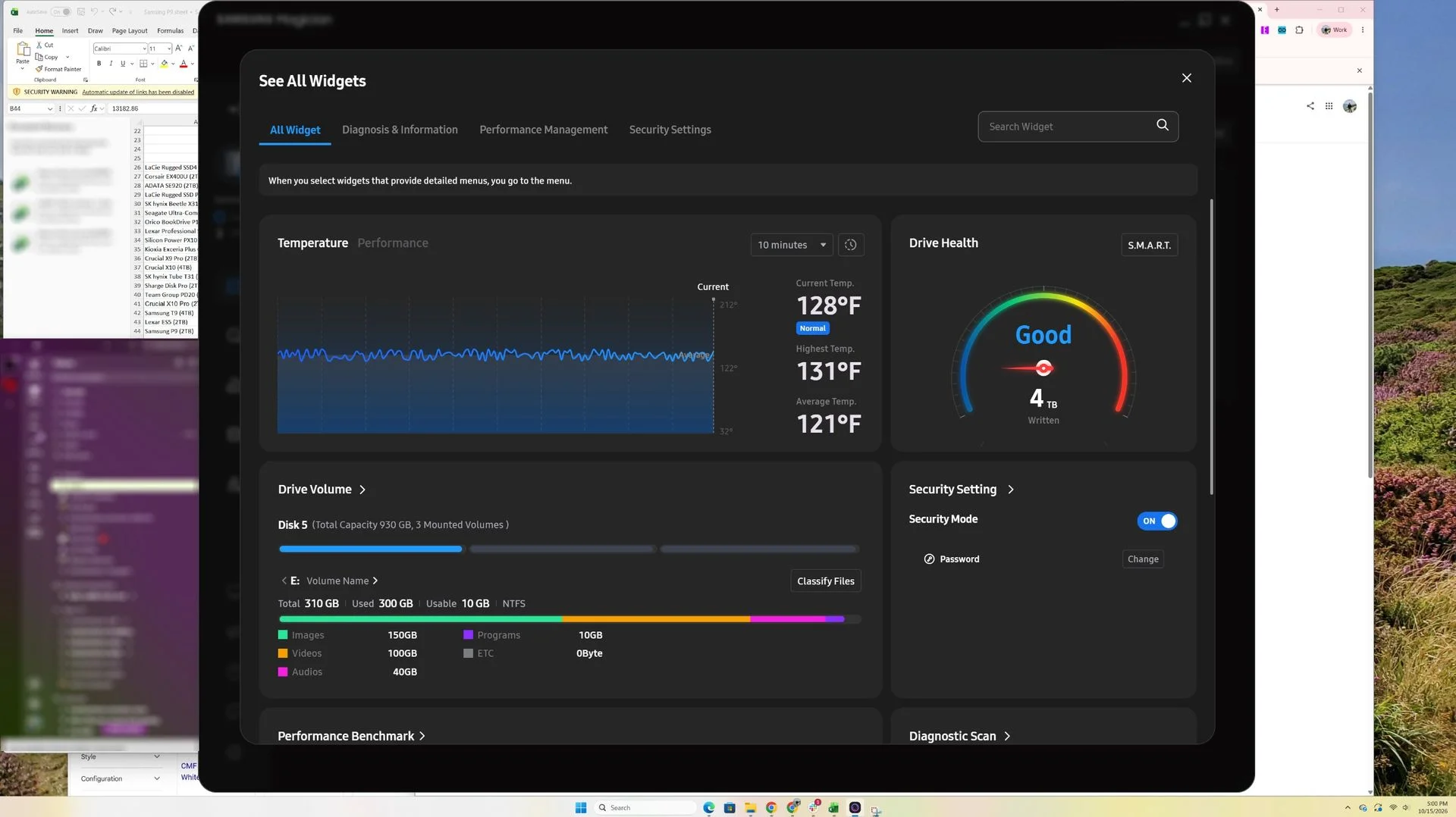
The P9 includes a link to Samsung Magician, but the drive itself doesn’t contain the full application; the link opens a prompt to download the latest version. Magician can check drive health and temperature, run diagnostics, monitor performance, and manage secure erase or encryption. The P9 supports 256-bit hardware encryption.
Magician has more storage-management features than many companion tools, though its desktop presentation feels oversized. Its rounded, mobile-app-style interface devotes a lot of screen space to a small set of readings. On a 65-inch display used as a monitor, the default health gauge appeared enormous; switching to compact mode reduced the interface but hid nearly everything except that gauge. The software covers the expected maintenance tasks, but its layout could make better use of a desktop screen.
Where the P9 wins in testing
The test system used an AMD Ryzen 7600X processor and an Asus ROG Crosshair X870E Hero motherboard, providing native USB4 support. The review also refreshed its external-drive benchmarks with CrystalDiskMark 8. Results from the final sustained sequential-write test weren’t rerun on the new system, so that chart uses an earlier test setup.
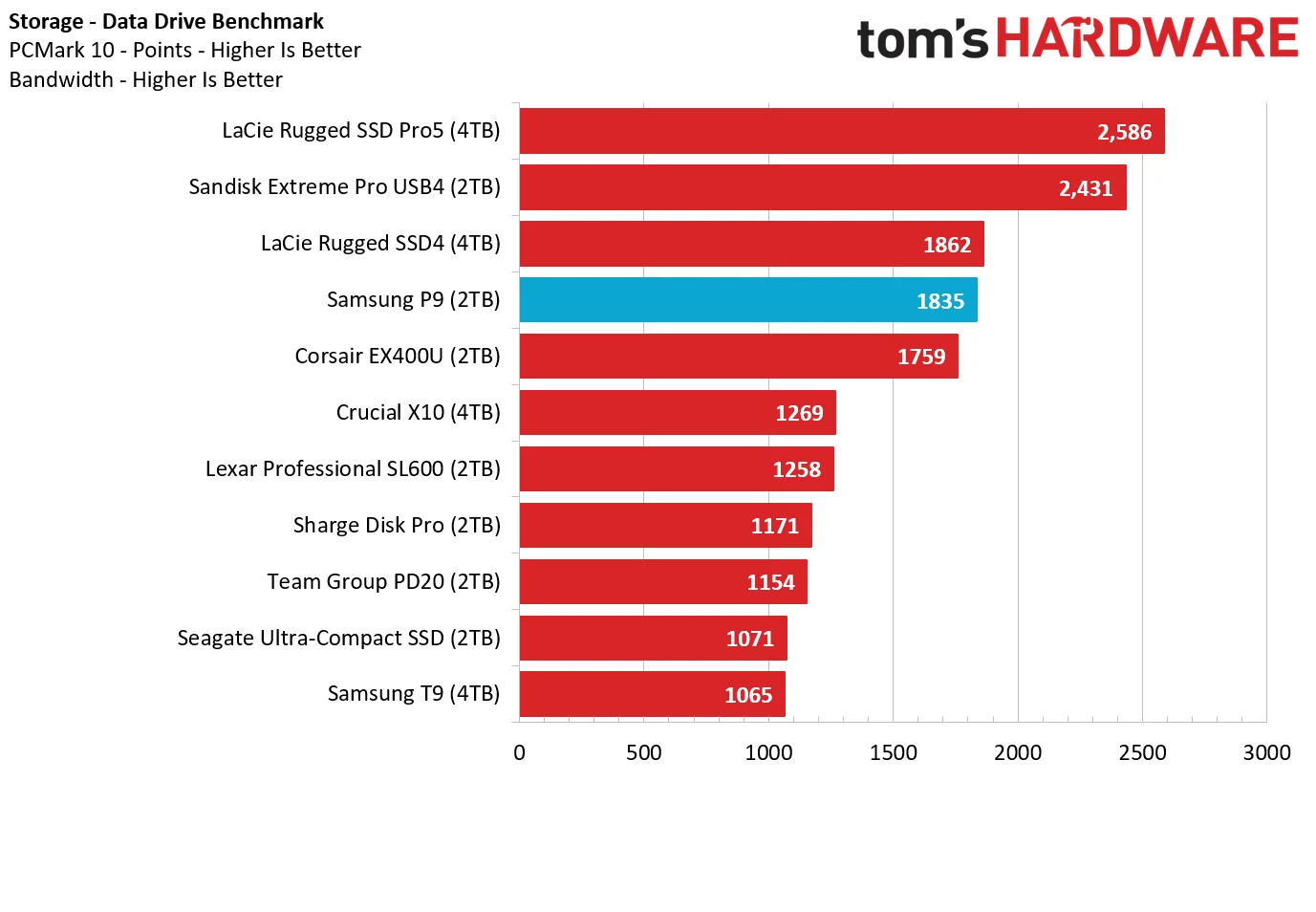
PCMark 10’s trace-based storage test was an early stumble for the Samsung drive. The P9 trailed LaCie’s Thunderbolt 5 SSD as well as USB4 models from LaCie and Sandisk. It did outperform Corsair’s EX400U. That result suggests the P9’s advantages don’t carry across every workload, especially tests built from application and everyday-use traces.
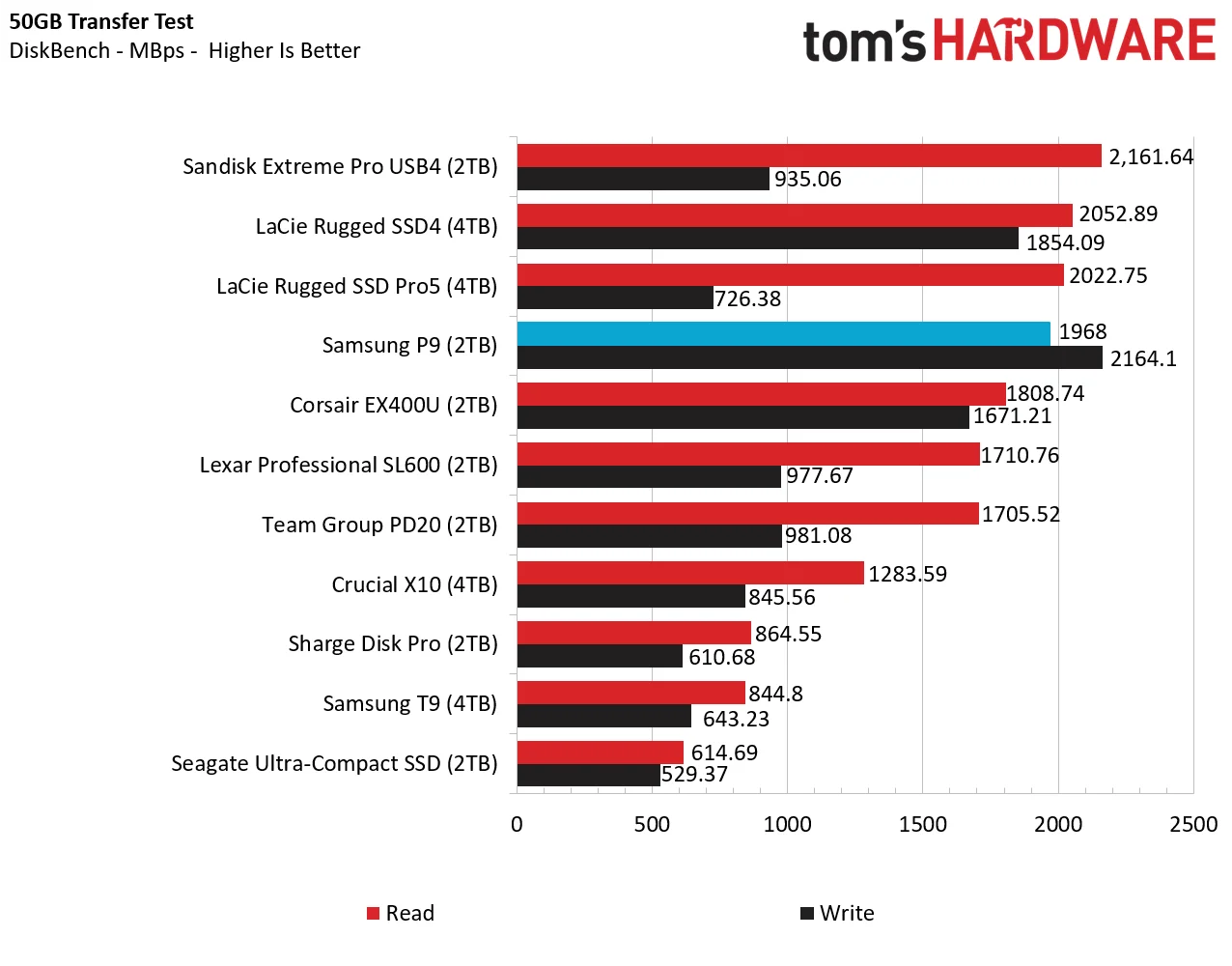
For the real-world DiskBench test, the system copied a 50GB collection of 4,617 photos, videos, and software ISO files to the drive, paused for five minutes, then copied the same data back. The P9 posted the fastest write result. Its read performance placed fourth, but it still beat Corsair and came close to Sandisk. Sandisk’s write result was less than half the P9’s in this test.
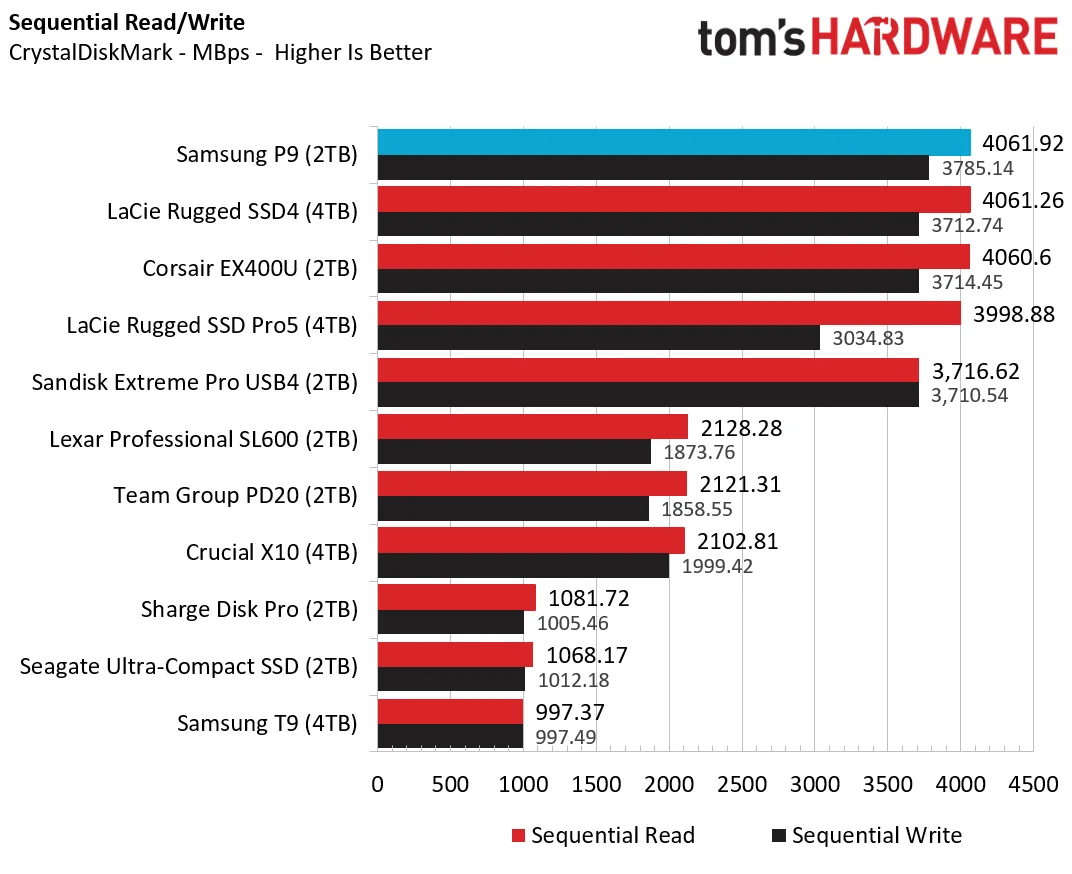
CrystalDiskMark gave the P9 its clearest win: it finished first in both sequential reads and writes. This benchmark reflects a best-case synthetic workload, and most of the high-end drives were fairly close. Sandisk’s USB4 drive fell a few hundred megabytes per second behind on reads but remained fast.
Long writes are the clearest advantage
Short bursts don’t reveal how an SSD behaves after its fast write cache fills. To examine that, the test wrote sequential data continuously for 15 minutes, then continued the run to 30 minutes. Samsung hasn’t disclosed the P9’s cache size, whether it changes with capacity, or whether it’s fixed or dynamic. The tested unit was 2TB, while some comparison drives had larger capacities, so the results aren’t a perfect capacity-for-capacity comparison.
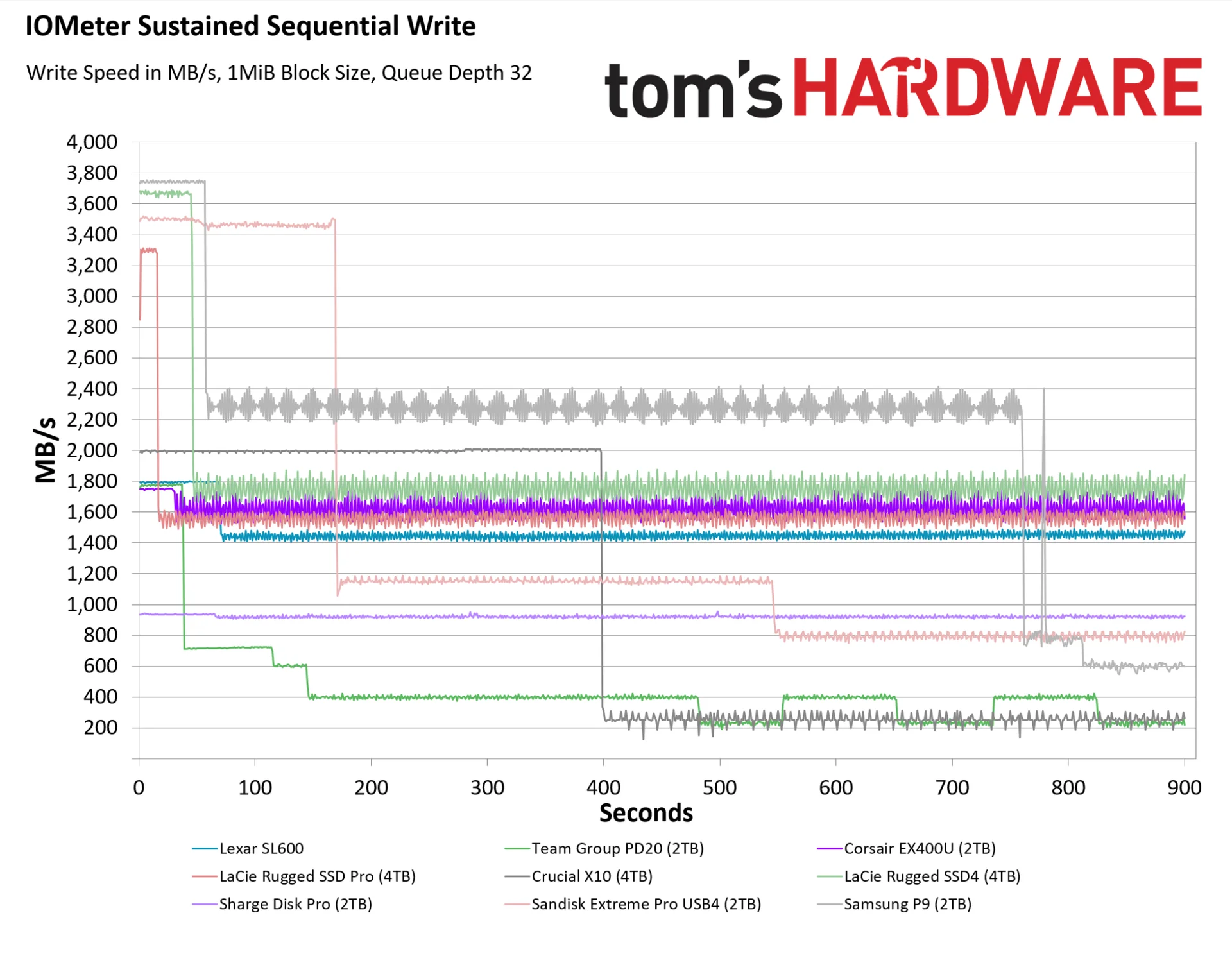
At first, the P9 wrote at around 3,750 MB/s, close to its rated maximum. After roughly a minute, it settled into a fluctuating band just below 2,200 to just above 2,400 MB/s. It held that pace for about 12 minutes before dropping to between 600 and 800 MB/s. During the longer run, it recovered to the 2,200–2,400 MB/s range after about 17 minutes and stayed there through the end.
Sandisk’s Extreme Pro sustained around 3,500 MB/s for roughly three times as long as the P9 before its speed fell. It then dropped to about 1,200 MB/s and later settled near 800 MB/s, where it remained until the 30-minute test ended. Corsair’s EX400U delivered steadier results, but never exceeded 1,800 MB/s and often slipped below 1,600 MB/s. For long transfers, the P9’s mid-run speeds give it a clear edge over Corsair.
The P9’s value depends on the work. At $649.99 for 2TB, it’s expensive, and Sandisk’s Extreme Pro costs $100 less at that capacity. Yet Samsung’s drive led in CrystalDiskMark, topped the real-world write test, and maintained higher write speeds than Corsair during extended transfers. Its slim body also takes up about a third less space than the Sandisk model, according to the review.
My read is that the Samsung P9 suits professionals who regularly move large files and can make use of USB4’s bandwidth, particularly when sustained writes matter more than the lowest purchase price. Sandisk remains a less expensive route to fast USB4 storage, while a 20Gbps drive such as Crucial’s X10 may cover lighter workloads for less. The P9’s standout feature is how quickly it keeps writing once a transfer stops being a short burst.


