Fitbit Edge review: Google finally gets the style and screen right
A polished tracker with a useful display and no AI assistant on your wrist. The catch: it costs more than many rivals.
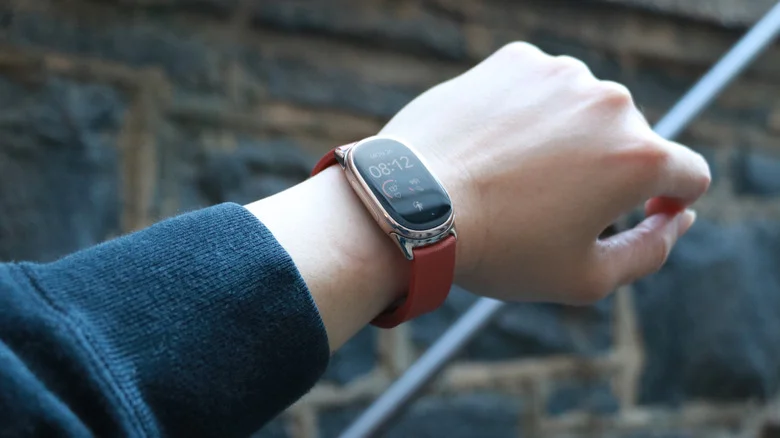
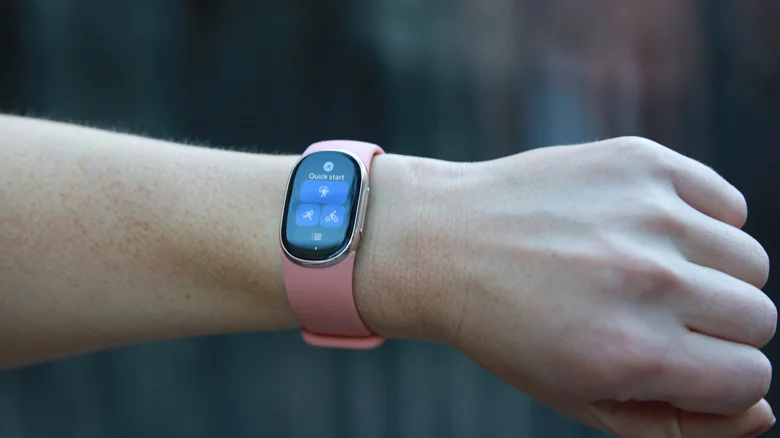
Fitbit has spent years trying to make a small activity tracker look like something you’d choose to wear. The Edge is the first one I’ve tried that makes a convincing case. Its bright touchscreen, slim shape and better-looking bands give it a more finished feel than earlier Fitbits, while keeping the device compact enough to stay out of the way during exercise.
That’s a more meaningful change than another round of step-counting features. When I reviewed the original Fitbit Alta, its size was appealing, but its stiff cuff-like band and generic look weren’t. Fitbit had teamed up with Tory Burch on accessories intended to make the Alta “super-chic,” but the result still looked like a fitness tracker squeezed into a smaller frame. The company introduced the Alta in 2016.
The Alta HR kept much of that design. The Fitbit Luxe brought a shinier stainless steel case and softer bands, and Fitbit called it one of its “most fashionable and comfortable devices yet.” I liked its small size more than its style.
The Edge is still an oblong, just a wider, rounder one than the Alta or Luxe. But the brighter screen, more attractive strap options and refreshed features make it feel like a current product rather than another exercise in shrinking a tracker. It earns a 9 out of 10: it’s comfortable, easy to read and works with Android and iOS, though its price is steep beside other Fitbits and competing devices.
Design and display
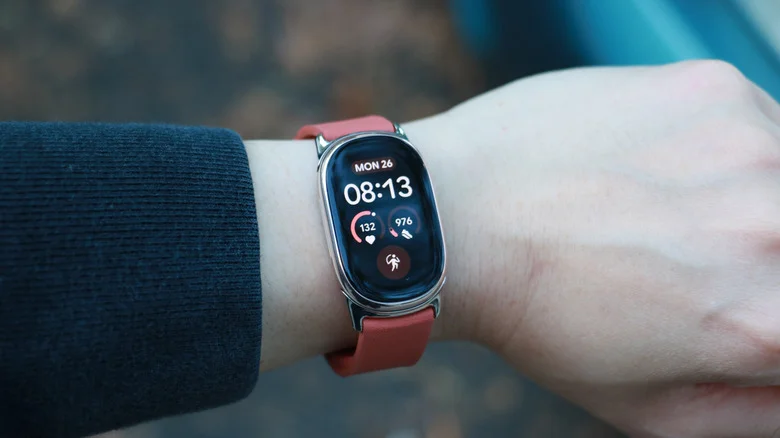
The Edge’s size gets the balance right between a screenless band and a full smartwatch. I liked the clean look of the Fitbit Air, but without a display I had to reach for my phone to start a workout or check my heart rate. That’s a real friction point if you’re trying to decide whether to pick up the pace or ease off mid-session.
On the other end, a Pixel Watch 5 or Apple Watch gives you a much larger screen, but that extra bulk can interfere with pushups and moving planks. The Edge’s narrower case mostly stays clear. I could bend my wrist substantially without hitting its side button, and didn’t need to rotate the device so the screen faced the inside of my wrist. Wider Apple, Pixel and Galaxy watches have buttons that can stick out enough to get pressed accidentally.
Trackers with this general shape aren’t new. What sets the Edge apart is the combination of a shiny case, slimmer bezels and a screen that’s actually practical to use. The Luxe’s display was too small and difficult to read; the Edge’s stayed bright and legible in different lighting. Most taps and swipes registered promptly. It isn’t the quickest wearable touchscreen I’ve used: sometimes I’d swipe to a tile and wait, usually because the device was still asleep. Once awake, it felt about as responsive as the Pixel Watch.
That’s a clear improvement over the dim, sluggish displays on older Fitbits, which often needed repeated prodding. The Edge also has a physical side button, a welcome choice after the touch-sensitive button on the Inspire 3 and the haptic control on the Charge 6.
In spirit, this feels like a Charge 7. The Edge’s case is roughly the same size, though a little larger and more rounded, and both devices support Google Maps and ECG readings. The Edge adds a larger screen with adjustable brightness, an altimeter for elevation gain and floors climbed, GPS for outdoor walks and runs, IP68 dust and water resistance, and a physical button. Both carry a 5 ATM rating, and the Edge has broader media playback support.
The comparison between the two gets complicated; Google’s feature-by-feature list runs long. One useful distinction: the Edge lacks NFC payments, which the Charge 6 supports. The Edge also costs about $20 more. That price premium buys a better screen and several added features, but losing tap-to-pay makes the trade-off less straightforward.
 Cherlynn Low for Engadget
Straps change the look—and the price
The straps do a lot of work here. Google sent two alternatives to the silicone band included in the box, and each made the Edge look more considered. Swapping them is straightforward: press the catch on the underside, pull the band away, then push its replacement into the groove.
I fumbled at first with the Magnet band’s clasp, which closes with magnets. Once I got the motion down, its slim profile and stainless steel lugs made it one of the better-looking options.
The Metal Links band was my favorite. The gold version Google supplied matched the Edge’s case so closely that it looked built in. A friend at the gym thought it resembled a Rolex. People on r/Rolex might disagree, but the band does give the tracker a more premium look. It also costs $150—about the price of a Fitbit Charge 6 and only $30 less than the Edge itself. That’s a lot to spend on an accessory.
Google also sent the new Metal Mesh band for the Fitbit Air. I like how much more polished it makes that tracker look, and it’s classier than many cheaper alternatives. At $70, though, it sits just $30 below the Air’s retail price. The accessory can make a less expensive tracker look sharper, but it also narrows the price gap between the two devices.
What the Fitbit Edge can do
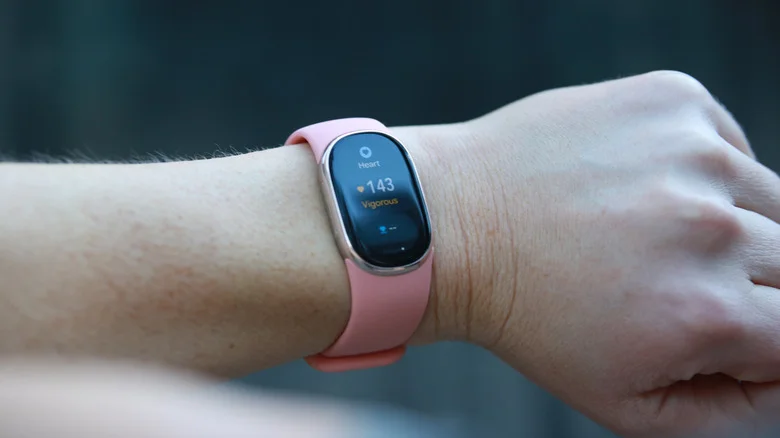
Google updated its automatic activity detection alongside the Edge launch. That matters for screenless devices like the Fitbit Air, which depend heavily on a phone, but it also makes the Edge less demanding to use. You don’t have to remember to start every walk or ride for the tracker to have a chance of recording it.
After a week with the Edge and several months using the Air, the new detection model seemed more sensitive and, so far, more accurate. I forgot to log several city walks and bike rides over one weekend. A few minutes after I finished, Google Health sent a notification saying it had detected exercise “with low confidence,” then asked me to confirm and label the activity. I did.
Eventually, it even learned to identify my quick e-scooter trips to the grocery store. I still started my morning cross-training sessions manually; F45 has trained me to do that because it records workout metrics poorly unless I time the session precisely. But the Edge’s tracking improved enough that I stopped worrying about every missed tap. That’s satisfying progress. I’d want more time with it before trusting the system completely, though: I’ve seen AI-based tools forget how to handle familiar tasks over time, and that kind of regression can wear down trust.
Beyond activity detection, the Edge keeps things simple. Sideways swipes move through cards showing daily progress and, depending on your setup, weather, sleep score, heart rate, cycle health and media controls. Swipe up for notifications; pull down from the top for shortcuts.
The shortcut panel is the most useful part of the interface. It lets you change brightness, check battery life, turn on Do Not Disturb or bedtime mode, lock the screen against water, broadcast your heart rate to nearby exercise machines or ping your phone. There’s also a flashlight. It’s bright enough to help search a dark purse or closet for a missing key or earring.
Pressing the side button opens the app drawer, with tools such as ECG, a stopwatch and media controls. The app selection is small, and you’ll need to install the apps you want through Google Health on your phone.
Most of the basics worked as expected. For an ECG, I held my fingers against either side of the case; after 30 seconds, the Edge reported normal results. I also put Adéla’s “Nicole Kidman” on repeat and used the media controls to jump back to the beginning quickly.
 Cherlynn Low for Engadget
The clearest test of the Fitbit Edge may be how well Google’s pieces work together—and here, the results are mixed. The watch’s health readings looked plausible in day-to-day use, but a one-off comparison at a primary care clinic showed why I wouldn’t treat any wrist reading as gospel: the clinic oximeter measured 65 beats per minute, the Edge reported 75 bpm, and an Apple Watch Series 12 worn at the same time showed a range of 63 to 77 bpm. For me, trends matter more than a single measurement, so that gap wasn’t enough to undermine the device.
Google Maps was a less reassuring integration. After enabling it in the Health app, I started navigation on my phone while tracking a run or ride. The Edge recognized that Maps had launched, then repeatedly told me to open Maps on both devices without displaying directions. I’ve asked Google for help and would revisit the verdict if this proves to be a broader problem. My setup was unusually crowded: multiple Fitbit devices were paired with several iPhones and a Pixel through Google’s Health app, which may have caused the failure.
That crowded setup also shaped my cross-platform testing. I used the Edge with a Pixel 11 Pro and an iPhone 17 Pro Max; the experience was largely alike, though iPhone users can’t reply to notifications from the watch. I also saw the Edge switch unexpectedly to an iPhone 18 Pro. That sounds more like a pairing problem in my reviewer setup than a typical user experience, but it’s a reminder that testing across several phones can expose rough edges.
Google Health app and AI Coach
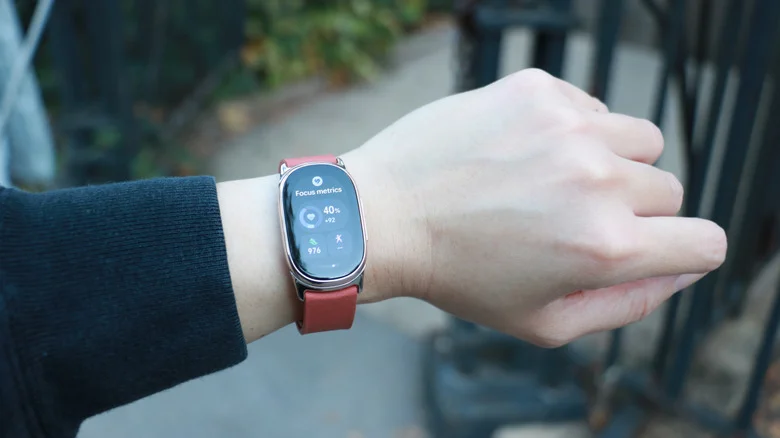
The Edge’s screen makes Google’s Health app optional for many daily checks. Once you’ve arranged your watch faces, tiles and apps, the device itself can show the day’s key metrics. I still relied on the app because I’d been using the Fitbit Air since reviewing it in May, and because I keep a close eye on weekly cardio-load targets. Its customizable stats panel and separate workout and sleep tabs are straightforward.
The Premium AI Health Coach adds something more personal, though its value is mostly in the continuity. When I was sick, my resting heart rate climbed and my cardio performance dipped. The Edge initially made me wonder whether its readings were off; the coach helped connect those changes to my illness, drawing on my heart-rate history. I could have searched the web, but context made its answer more reassuring.
I’ve also asked it about headaches, cycle symptoms and exercise form. Its chat history can serve as a useful record before a doctor’s appointment. Still, the coach can lose track of what it already knows: after advising me to take it easy while I was sick, it suggested checking the weather when I asked about going for a walk—even though its morning summary had said conditions were good. It eventually acknowledged my sleep score was 81, but couldn’t retrieve local weather details.
That’s the trade-off. The coach can offer encouragement and basic guidance, and it does direct users to professional care when a situation sounds serious. When I said it felt like my throat was closing, it refused to suggest self-treatment and advised calling 911, contacting a doctor or qualified healthcare provider right away, or going to an emergency room. The response felt alarmed, but caution was the right call.
Battery life and charging
Two days of use is a realistic expectation with the Always On Display enabled. Turning it off stretches runtime, and bedtime mode can make the battery barely move while the screen is dimmed. In one stretch, the Edge went from about 49 percent at the end of Tuesday to 16 percent Wednesday night, then had roughly 8 percent left the next morning—without overnight sleep tracking.
Charging is the Edge’s strongest counter to that modest endurance. A six-minute top-up from an in-car USB-C port lifted it to 28 percent; 24 minutes later it was at 90 percent. Google’s claim of a full charge in 90 minutes matched my experience. Charging slowed a little above 90 percent, as it commonly does to protect battery life.
I’ve seen Google make fast charging a meaningful part of the experience with the Pixel Watch 4 and Fitbit Air, and it helps keep the Edge’s battery from becoming a daily concern. But forgetting the charger still matters: I once left home with only 50 percent and had to get through the workday without my usual overnight charge. A shared charger for the Edge and Air is a practical perk if you own both. A broader charging standard—or USB-C on more wearables—would be better, though fitting a port into a small, component-packed watch is a real constraint.
Wrap-up
At $180, the Fitbit Edge makes a persuasive case for a focused fitness watch. It costs less than the Pixel Watch 5 and Apple Watch Series 12, works with iPhones and Android phones, and covers health tracking and phone notifications without trying to do everything. Its battery lasts a little over two days with the screen always on, and longer when it isn’t. I mainly missed the Pixel Watch 5’s gesture controls and some assistant features; basic tasks such as setting a five-minute timer or checking the forecast were still easy to reach with a swipe.
The larger point is that Google and Fitbit seem to have found a workable balance. The Edge pairs appealing hardware with a clean, approachable operating system, while the Fitbit Air and Google Health experience extend that mix. It feels like Fitbit has a credible route back into the activity-tracker category it helped define. I’m glad Google kept the name—and the Edge gives the partnership a strong reason to keep building on it.


